


Bett UK – 2026 highlights, edtech trends & visitor tips

Bett 2026 is here! Here’s what to expect and why you should be there…

- by Teachwire
Bett, short for the British Educational Training and Technology Show, is one of the world’s leading events in the field of education technology (edtech).
It’s an annual trade show and conference that brings together educators, edtech companies, policymakers and education professionals from around the globe to showcase the latest innovations, share best practice and discuss the future of education technology.
How to attend Bett UK 2027
When is Bett UK 2027?
It takes place between 20th-22nd January 2027. The theme is yet to be announced, but the theme for 2026 was “Learning without limits.”
Where is Bett UK 2027?
It’s held at ExCel London.
Is Bett UK 2027 free?
Yes! Educators and individuals from schools can register for free tickets.
Bett 2026 highlights
There’s so much to see at Bett, we’ve let the Teachwire team do the hard work for you. These handpicked highlights showcase classroom tech that’s smart, interactive and genuinely engaging – from turning pupils into Shakespearean directors to giving school leaders a complete view of improvement priorities, or even letting kids explore AI through play. Watch, be inspired and imagine what these innovations could do in your classroom.
Connect and improve with JoinUp
Who? Juniper Education
Why we love it: JoinUp from Juniper Education is a game-changer for schools wanting to drive real improvement. This free, centralised platform connects systems, services and people, giving school leaders, business managers and MATs the flexibility to create a personalised ecosystem that matches their improvement priorities.
No more siloed data or rigid all-in-one solutions – JoinUp lets you bring everything together in one place, making it easier to see the big picture and act on it.
Panel power with Promethean
Who? Promethean
Why we love it: This Elevator Pitch from Promethean’s Matthew Barfield gets straight to the point: Promethean’s ActivPanel range is all about making everyday teaching feel easier, slicker and more engaging.
The ActivPanels are designed around real classroom needs. They feature intuitive tools and a smooth, responsive experience that lets you focus on teaching rather than troubleshooting technology, giving you more time for explaining, questioning and responding to pupils in the moment.
Whole-school insight with Seesaw
Who? Seesaw
Why we love it: Seesaw is an all-in-one learning platform that combines digital portfolios, interactive lessons and insights. It gives you meaningful visibility at pupil, class and whole-school level, making it easier for you to evidence learning, track outcomes and focus support where it’s needed most.
You can quickly generate or adapt activities from existing resources, align them to your objectives and get learning up and running without added workload.
Spotlight on Shakespeare
Who? Royal Shakespeare Company
Why we love it: The Shakespeare Curriculum is a fresh, interactive way to teach the Bard in KS3 and KS4. It’s a digital platform that brings the award-winning theatre company’s teaching methods straight into the classroom – and it’s free for all UK state schools.
It turns students into directors, actors and artists, letting them make creative choices just like in a rehearsal room, which makes lessons more engaging, interactive and confidence-boosting.
AI comes to life with LEGO®
Who? LEGO® Education
Why we love it: LEGO® Education Computer Science & AI is a curriculum offering over 190 hours of hands-on instructional materials, giving students the chance to explore the core ideas behind AI, not just the latest tools or chatbots.
By encouraging play, experimentation and creative problem-solving, it engages learners while building a deep understanding of AI concepts.
Bett UK 2026 features
In 2026, Bett expanded the exhibition floor, introduced new community villages and brought Tech User Labs onto the show floor.
It was your chance to explore the latest trends in education, access hundreds of hours of free CPD, and connect with the global education community, all under one roof.
Special speakers
From Hannah Fry to Amol Rajan, 2026’s carefully curated line-up of special guests inspired and educated across the key topics shaping the future of education.
Dawn Taylor talked about redefining the teacher’s role in the age of AI, while Mark Martin explained how schools could join AI Awareness Day 2026 to build digital literacy and creativity.
Solution providers
Over 500 companies exhibit at Bett, including big names such as Google, Dell and Microsoft.

TableTalks
Take part in peer-led discussions to inspire change and spark new ideas within your school. Select your sessions prior to the show, based on your primary topics of interest.
Connect @ Bett
If you’re a decision maker, Bett UK enables you to easily make connections with the right solution providers, taking the ‘work’ out of networking.
Tech User Labs
Bett’s most popular programme, Tech User Labs, is back for another year. Attend free sessions to learn how to get the most out of your current tech. You can also explore emerging innovations within education.
CPD-accredited content
Your Bett UK ticket gives you access to hundreds of hours of CPD-accredited content designed to drive meaningful impact in classrooms worldwide. The agenda deep dives into AI, SEND, edtech innovation and more.
Women in Edtech Mentoring Circles
Designed as a supportive, safe space for women across both education and tech, these circles bring peers together to share experiences, offer advice and build meaningful connections.
Whether you’re a woman in the sector or an ally championing female leadership, the Mentoring Circles provide an invaluable opportunity to learn, connect and grow.
Bett UK will also unveil its Edtech 10 List, a celebration of ten trailblazing females redefining the next era of education technology.
MSP Village and SEND Village
These vibrant, community-led spaces were created to bring peers together around shared challenges and real-world opportunities.
Curated with partners, educators and experts, these hubs offer networking, content, workshops and rich resources in an environment built on collaboration and shared purpose.
Bett 2025 highlights
Teachwire writers Callum Fauser, Elaine Bennett and Charley Rogers reported live from Bett 2025. Here are some of our highlights…
Vapes vanquished?
Who? Volan
Why we love it: If you’re relying on conventional smoke detectors to catch miscreants vaping in the school toilets, then you may know the misery of having to evacuate the whole school when said detectors are triggered.
Volan’s clever vape detection devices seek to make that a thing of the past, featuring sensors designed to pick up on vaping emissions specifically, wireless connectivity with the ability to issue SMS/email alerts to staff, and onboard AI assistance to guard against false positives.
Audiovisual kit made easy
Who? The Cinema Shop
Why we love it: At first glance, this ‘video and sound system in a box’ solution might seem like something of a throwback. We have IWBs for all our classroom audiovisual needs now, don’t we? In some respects, yes.
However, what if you want your students to view a film more comfortably in much better quality (as part of an al fresco screening, maybe)? Or perhaps you want to amplify music from digital sources at decent volumes while also being able to call upon your own personal PA system via thoughtfully configured hardware all at the same time.
If that’s the case, you might want to investigate the tailor-made mobile AV cabinets offered by this Gloucester-based outfit…
Marking versus machine
Who? DeepGrade
Why we love it: It’s all very well having AI help out with the marking of multiple choice questions and the numerical rights and wrongs of maths assessments. How about marking a handwritten essay?
That’s not a problem for DeepGrade, which can extract the content of scanned longhand essays and exam responses, apply a specific subject/marking criteria (for English, geography, history, etc.) and then grade it – with teachers naturally able to check the end result and make any fine adjustments, if needed.
Playful coding
Who? Achoka
Why we love it: This French toy and carpeting specialist’s adorable ‘Achoka Bot’ is designed to familiarise younger learners with the basic principles of coding. As seen in this demo, simply tap the robot on the directions shown on the accompanying mat, and it’ll dutifully trundle off to perform its instructions in sequence.
Speedy feedback
Who? TeacherMatic
Why we love it: Esam talks us through his workload-busting Feedback Generator tool – and the importance of using AI ethically, safely and responsibly. As he puts it, “As professionals, we are obliged to do that.”
Digital dissection
Who? Anatomage
Why we love it: Examine a digital specimen when studying anatomy with this very cool tool from Anatomage. Use it in practical sessions and simplify it as much as you need, depending on your students’ level.
Instant translation
Who? Pocketalk
Why we love it: Do you have lots of students with EAL or do you find it difficult to communicate with parents who speak a different language? Pocketalk is a small device that instantly translates spoken words into over 80 languages.
Grade prediction maths app
Who? Bow Tie Maths
Why we love it: After teaching for 20 years, Rob Wakeling has set up Bow Tie Maths, a student tracking app that supports progress, reduces your workload and predicts pupils’ grades. You can set activities for your class with a few clicks, and there’s no marking either.
Collect money easily
Who? ParentPay
Why we love it: No one wants to spend hours tracking down missing payments from parents. ParentPay lets you easily set up, collect and manage payments, whether for a one-off disco or a regular, ongoing club. There’s also the option to let parents pay in instalments to help families manage their budget.
EAL scaffolding
Who? BOOKR Class
Why we love it: If you have pupils in your class who speak English as an additional language (EAL), you may want to check out BOOKR Class, a library of original stories and interactive games to help children learn the language.
Packed with different genres and themes, all designed to introduce English from beginner level up to intermediate, BOOKR Class can help scaffold your EAL teaching and engage pupils.
Screen-free literacy
Who? Yoto
Why we love it: If you have children, or friends with children, chances are you’ve already heard of Yoto, the screen-free musical companion for ages 0-12+.
Pop a card in the Yoto player and hear your chosen music or audiobook come to life (or even record your own), without the need to connect to the internet, and without any ads. Players come in both regular and mini sizes, with over 1,000 cards to choose from, including curriculum content like maths.
SEN companion
Who? Steppit
Why we love it: The belief that any child can learn any subject as long as they’re taught in the right way is not necessarily a new one, but this digital programme of teaching is an innovative way of approaching it.
Steppit provides videos on a plethora of subjects, from forces in physics to art and design, in various different formats, depending on the child’s needs.
Videos include teaching in British Sign Language, as well as a variety of approaches for children who may have ADHD, autism, pathological demand avoidance, and others. A great SEN companion for any classroom.
Coding legend
Who? Robotical
Why we love it: Marty the Robot has flown from obscurity to outright coding legend in only a few short years, and there’s a reason.
Kids love this fun, hands-on piece of kit, which can be programmed to sing, dance, walk, and many other actions.
Robotical aims to engage and inspire the next generation of scientists and engineers – a fine goal, and one at which Marty appears to be succeeding.
Seamless digital systems
Who? RM Technology
What are they offering? Next Generation Services. This is RM’s ‘modular approach’ to service delivery, aimed at ensuring schools have an effective – and affordable – way of making the best use of the digital tech they have, via systems and staff training precisely tuned to their current needs, and however those needs might change in the years to come.
Previous Bett highlights
2024
Teachwire writers Callum Fauser, Elaine Bennett and Lydia Grove reported live from Bett 2024. Here are some of our highlights…
Two-minute marking
Who? SchoolOnline.ai
Why we love it: We spoke to Jonathan at SchoolOnline.ai about how OlexAI can help you deliver rich and accurate feedback across extended writing tasks in under two minutes. That’s for a class of 30, by the way!
Motion sensor music
Who? The Soundbeam Project Ltd
Why we love it: This is a music-making package with a difference. Soundbeam lets students with limited mobility produce music via the movement of hands and limbs. Having plied their trade for some 30 years, Soundbeam is a known quantity among special school staff and SENCos at this point.
On show at Bett was the latest iteration of its hardware. It’s faster, smoother and slicker than before, while still retaining all the stability and approachability that users have come to expect. The motion sensors connect to a self-contained computer unit, and you’re off.
There’s no fiddling with device drivers or complicated software configurations. Simply set it up where it’s required and switch it on. Your students can make richly layered, pleasantly textured music via physical movements (which can be as fine or as big as you need them to be) in no time.
Inclusive technology
Who? Texthelp
Why we love it: Texthelp creates technology that helps make education more inclusive for everyone. Here, Hayley talks us through two specific features that are particularly useful for pupils with dyslexia – text-to-speech and screen masking.
Foldable LED screen
Who? ViewSonic
Why we love it: Okay, so it’s almost comically extravagant, and far beyond the kind of thing you could justify equipping your reception area with. But seriously, just look at it.
A 135-inch, 1080p LED display screen that can be folded up and packed away inside a fully integrated (albeit still rather large and very heavy) wheeled flight case.
When fully unfolded, those hinged seams appear to seamlessly vanish as if by magic. It’s available right now, and already being iterated upon – with additional handles apparently being promised for the newer version…
There were also some more conventional educational offerings to be found on ViewSonic’s stand. This included an optical touchscreen whiteboard that can be made to behave just like the chalkboards of old. That’s down to letting you erase markings with your forearm, should you wish.
You can also turn any messily scrawled words or simple diagrams into a series of distinct characters. You can then individually drag, drop and rearrange these as needed.
Easy log-in options
Who? MyLogin
Why we love it: Maximise lesson time and student engagement with lightning-fast login. MyLogin means no more complex passwords. Here, Elly Page explains how students can log in via emoji passwords and magic badges for hassle-free learning.
Informed teaching decisions
Who? Magma Math
Why we love it: Watch Ludwig from Magma Math demonstrate how to use its maths software to help you make live, informed teaching decisions.
Once pupils have submitted their answers, you can display all their answers anonymously on the board. You can then have discussions about the ways they solved the problem. You can even play back a student answering the question so everyone can see what they did right or wrong.
Instant planning
Who? Padlet
Why we love it: Junyu Wei demonstrates how you can use Padlet to plan lessons fast. Enter a keyword then generate learning objectives, materials and resources, instruction, assessment, closure and homework in just a minute or two.
A new STEAM solution
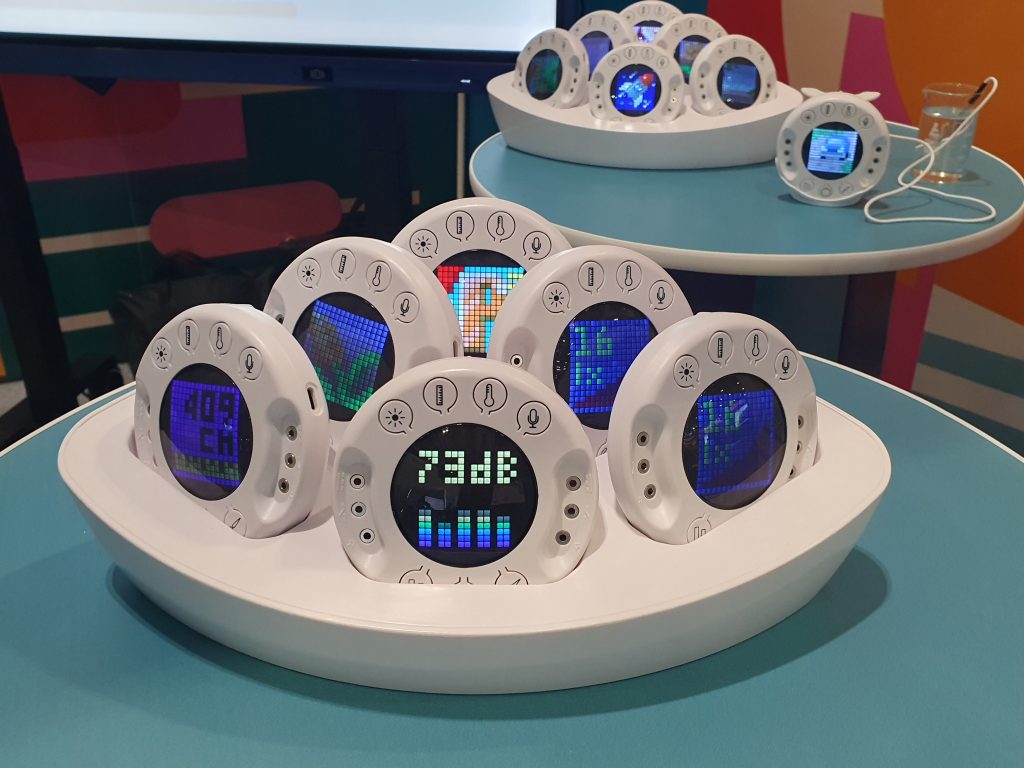
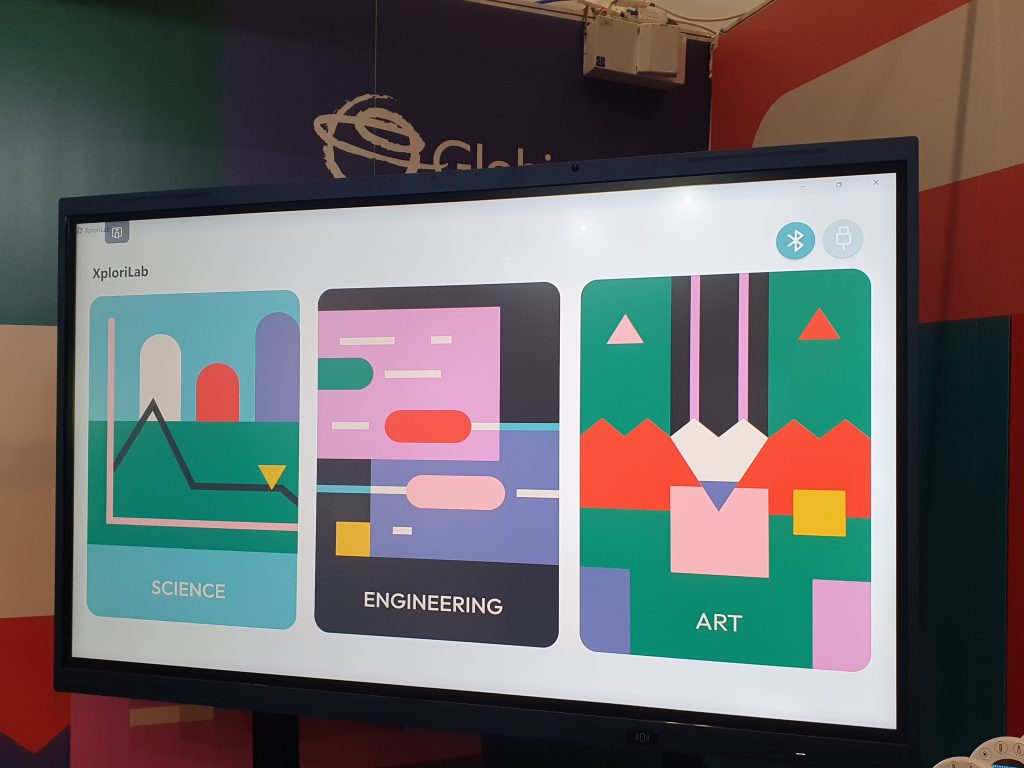
Who? Globisens
Why we love it: The wireless Xploris device, which hits the UK market in May 2024, allows children to integrate science, engineering and art in immersive activities supported by inviting and easy-to-use software. Teachers can take advantage of a suite of lesson plans. Watch as the device alters the speed of an animation depending on the temperature of a glass of water!
Lively learning
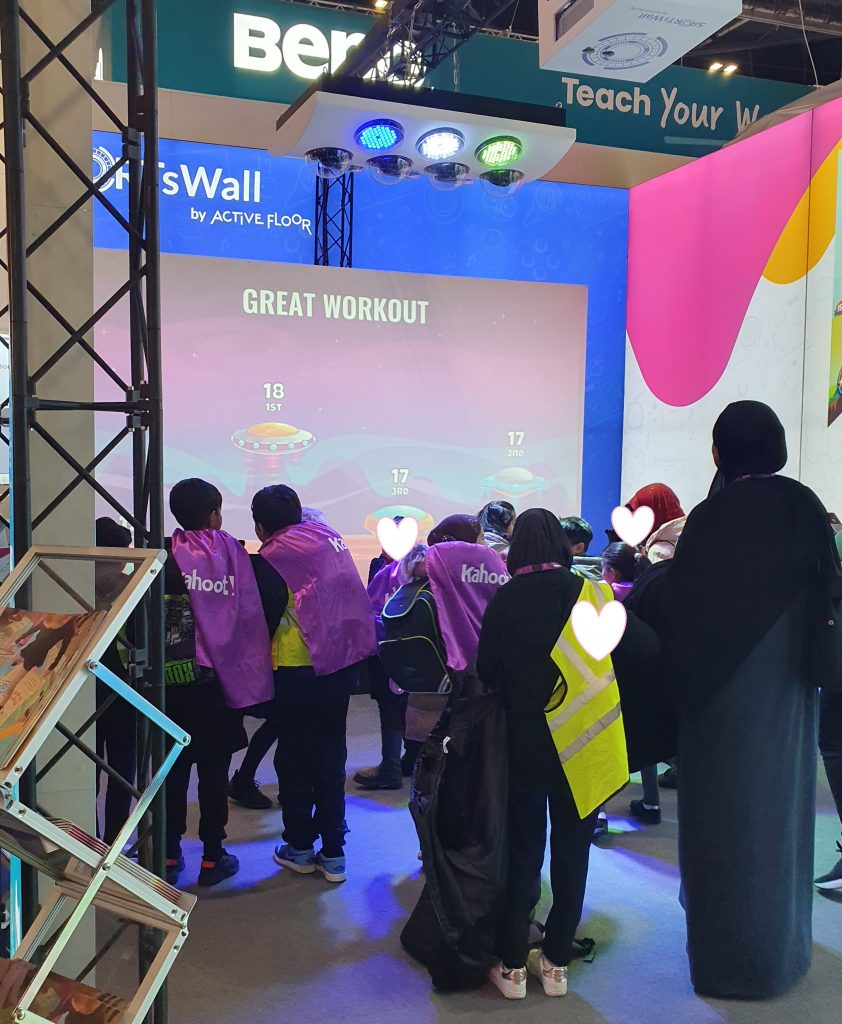
Who? Active Floor
Why we love it: A visiting class were having great fun playing ‘basketball’ when we arrived at the stand. You’ll need to invest in one of Active Floor’s projectors* and a software subscription to get started, but once you’re in you can access and adapt over 10,000 games – many designed by fellow teachers. A nice option is that you can save your games to the hardware even if your subscription lapses. *Prices start at £3,390.
Impressive 3D AR
Who? Innovative Technology Products
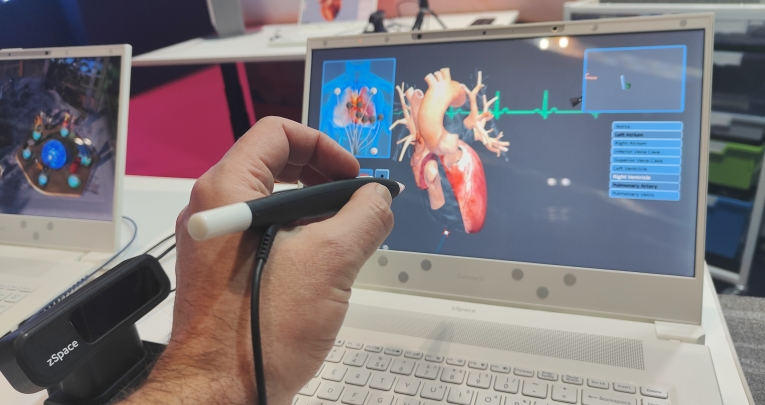
Why we love it: zSpace is an augmented reality learning solution that really works. Comprising a laptop with a 3D screen, a clever motion-controlled stylus set up and dedicated software, the zSpace package lets you ‘pick up’ objects displayed on screen and ‘pull them out’ so that they appear to be hovering above the keyboard.
The potential when applied to complex 3D objects is huge – our brief hands-on demo saw us rotating and examining a human heart, before peeling away its outer layers to get a good look inside. The overall effect is impressive to behold – though be advised that prices start at £5,200…
Literacy interventions
Who? OrCam UK Ltd
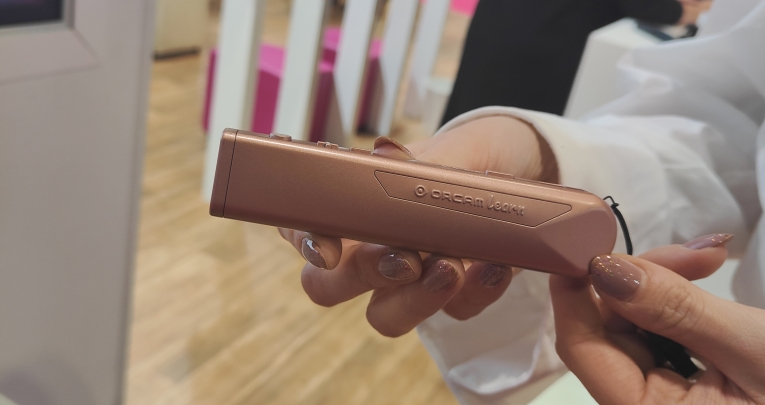
Why we love it: The OrCam Learn is a pen-shaped, handheld device that can scan the text of any printed matter – books, newspapers, magazines – and then read said text aloud, translate it, or even (with some accompanying software) test students’ ability to read it out loud. The OrCam Learn has previously been used to support EAL students and learners with SEND, but its newly added oracy features make it a potentially good fit for any students requiring literacy interventions.
When paired with a computer and mic-equipped headset, the software will display a passage from a previously scanned text, and give users instant feedback on their reading performance, including suggestions for words they might want to practice saying a bit more, while feeding back all manner of detailed comprehension data to teachers.
Smart storage and charging
Who? LapSafe®
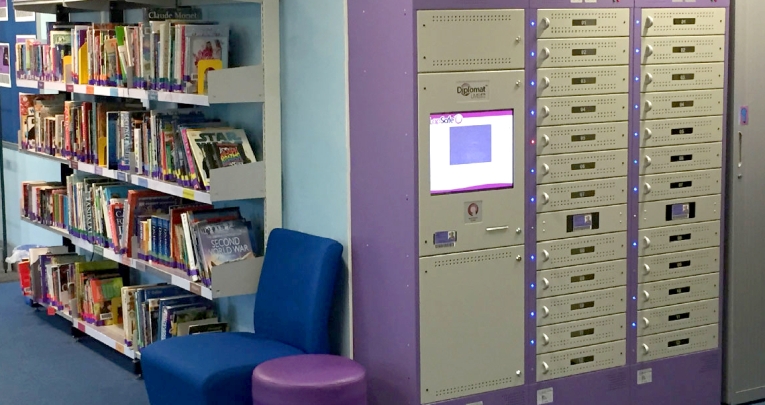
Why we love it: LapSafe® is a leading provider of charging solutions and self-service smart lockers. With over 20 years of experience, they’re a trusted supplier to the education industry. The complete range is being showcased at this year’s Bett.
AI-assisted literacy interventions
Who? Microsoft
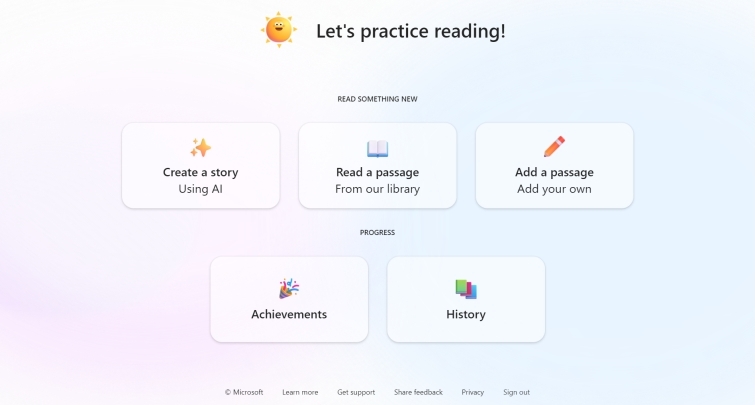
Why we love it: How often have you lost a chunk of the working day (or, more realistically, odd ‘working evening’) trying to source some English comprehension text that’s just right – namely age-appropriate, able to speak to students’ interests and perfectly calibrated to their interests? That’s a task that Microsoft is seeking to simplify with the latest iteration of its Reading Coach application.
Available either as part of an existing Microsoft 365 Education package or as a standalone Windows app, it makes use of ChatGPT’s AI smarts to generate new passages of text to help learners practice and be assessed on their reading skills as they read said passages aloud.
The ‘365’ version includes extensive reporting that will feed data on learners’ scores and progress back to teachers, as one might expect. The standalone version, targeted more at parents and individual students, includes some gamification elements (such as the ability to unlock character avatars), and provides more limited feedback to users there and then.
Reading Coach is currently in a ‘free public preview phase’ – but If you’re a literacy specialist at a school already signed up to Microsoft’s ecosystem, the good news is that you can see what it’s capable of right now.
Movie magic
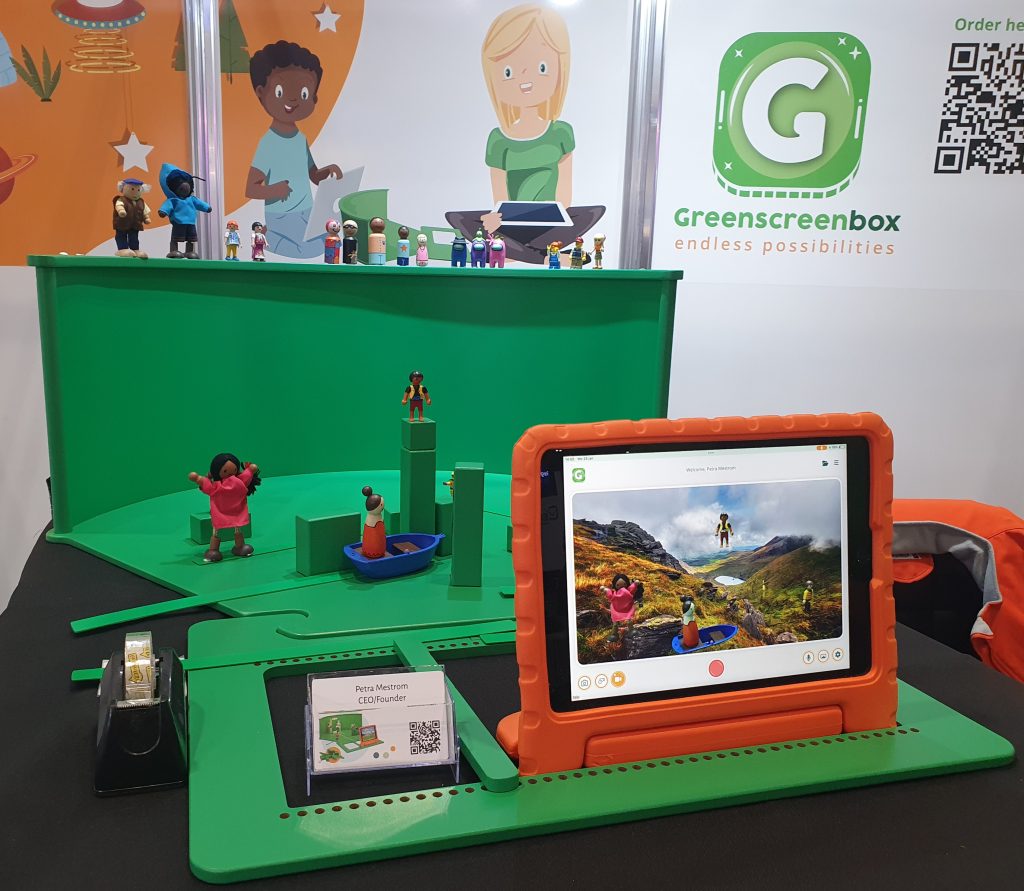
Who? Greenscreenbox
Why we love it: Established in the EU, this company are just entering the UK market with their hands-on greenscreening kits. Use the blocks, backdrops and batons provided to create and move characters around a set. You can then use the Greenscreenbox software on tablet or desktop to add backgrounds to your scene – choose your image from a gallery or upload your own photos.
Characterful classroom organisation
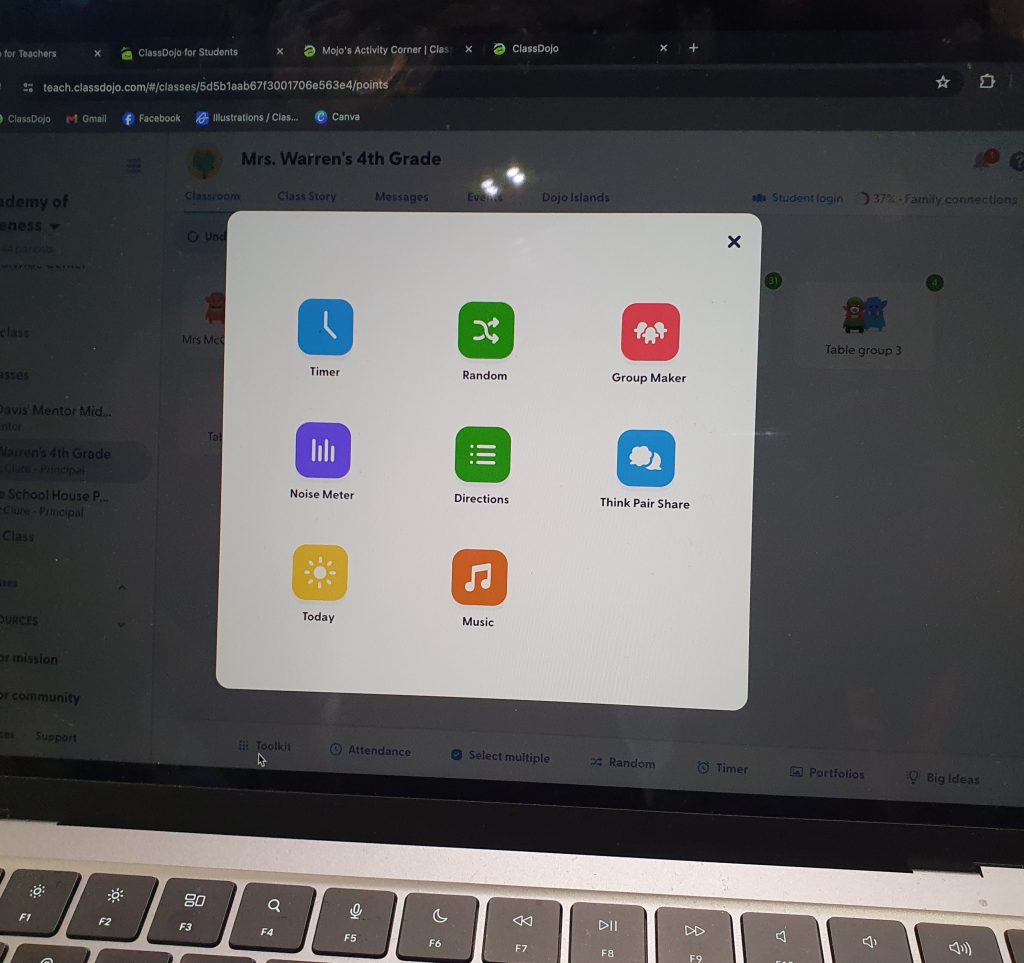
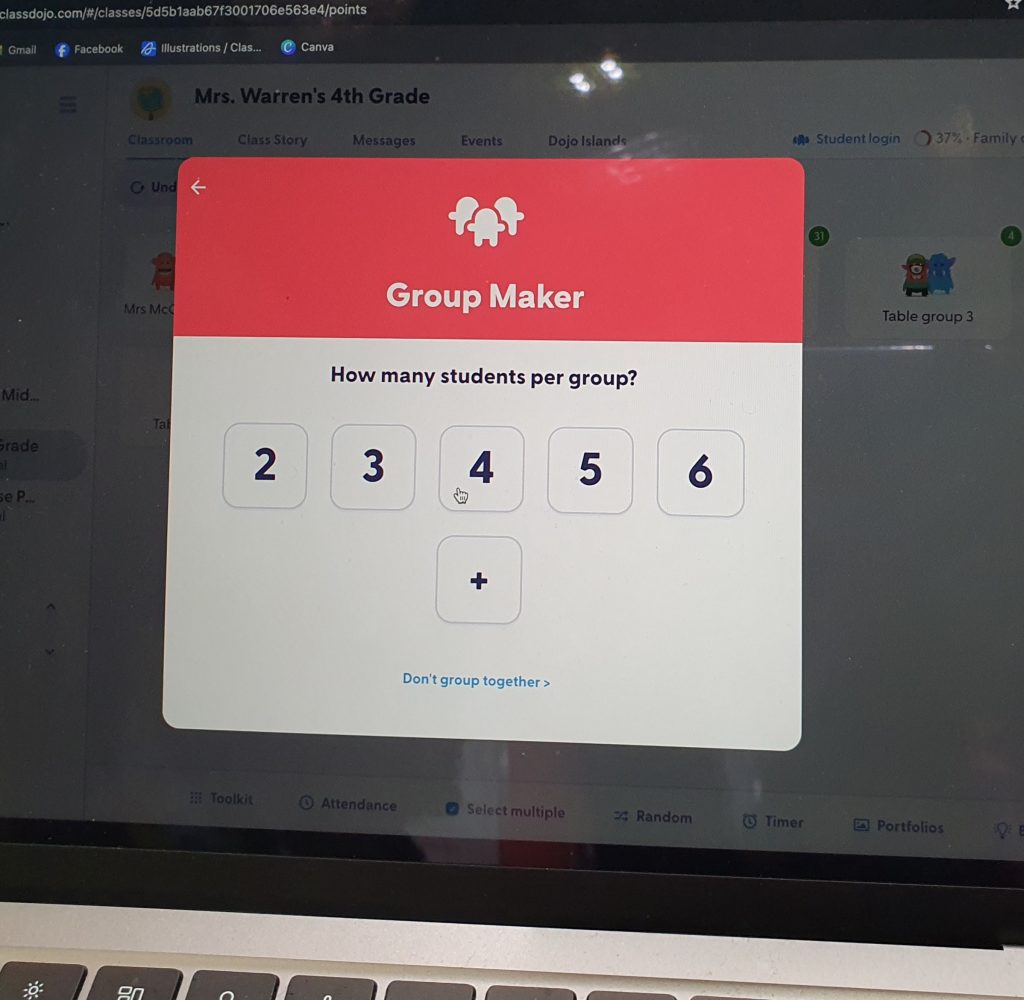
Who? ClassDojo
Why we love it: Although designed very much with the American school system in mind, this free software contains some great practical tools to help you organise, monitor and feed back to groups, Talk Partners or individuals. It can also be used as a self-contained and secure social portal for parent-teacher interactions – there are lots of opportunities to tailor how it works for you.
A playful introduction to robotics
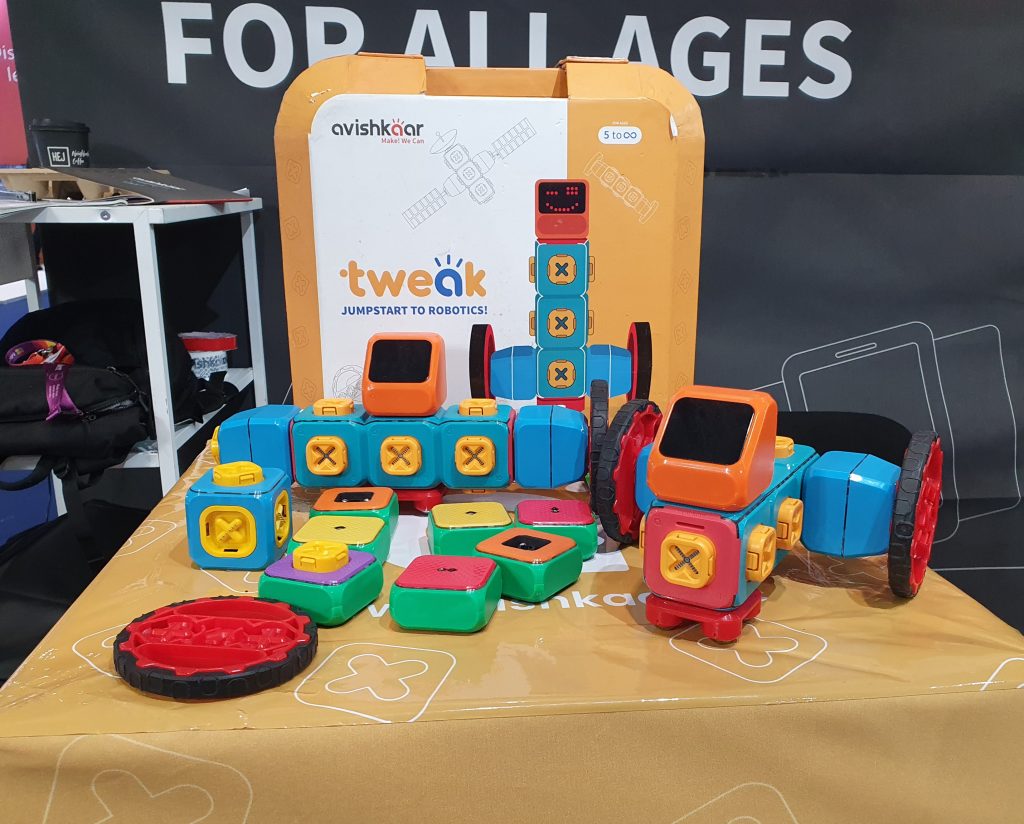
Who? Avishkaar
Why we love it: The chunky ‘building blocks’ in the Tweak system for ages 5+ are easy to manipulate and just ask to be assembled into fun new creations using the snap-fit mechanism. Children can learn to program their robots using the app, and even join Tweak League, an online robotics challenge.
The company also offers popular Mex kits for ages 8+.
Making the most of your visit to Bett

Longstanding attendee and Bett pro, Martin Bailey, shares his tips for making the most of the show…
Top advice for newbies?
Until you first visit Bett you can’t appreciate the enormity of it. Planning is everything! Make a list of vendors you want to visit and plan a route – there are many different zones!
Make a timetable, too, of the talks you want to see, but do allow yourself some time to simply wander. One of the beauties of Bett is discovering those new things!
Wear sensible shoes (you will definitely get your steps in) and pack some water. You will most likely be taking photos on your phone and posting on social media about your Bett experiences too, so it is well worth taking a phone charger.
What should I bring?
A colleague! Bett is most definitely an experience best shared and I would recommend all schools to send more than one staff member if they can.
Things are always far better articulated and disseminated back into school when there has been more than one person visiting, and it also allows you to view more of what is on offer. Ideally, try to visit for more than one day too.
Martin Bailey is the digital enrichment leader at Lanchester EP Primary School in Durham, and has been attending Bett for 15 years.
What happens at Bett?

Showcasing innovation
Bett serves as a platform for edtech companies to present their latest products and solutions straight to teachers. By attending, you’ll get a glimpse into the cutting-edge technologies and trends that are shaping the future of education.
Professional development
You can attend workshops, presentations and hands-on sessions to learn about effective ways to integrate technology into your classroom and improve teaching and learning.
Networking and collaboration
As a teacher you can connect with like-minded individuals, exchange ideas and form partnerships that can lead to the development of innovative educational solutions at your school.
Policy and research discussions
Bett often features discussions and presentations on educational policy and research. This can help you stay informed about the latest developments and insights in the education sector.
Global perspective
The international nature of Bett allows you to gain a global perspective on education technology. Learn from and connect with professionals from diverse educational systems and backgrounds.
Influence on edtech trends
Bett often sets the tone for edtech trends for the coming year. It showcases emerging technologies, pedagogical approaches and best practices that are likely to impact you in the classroom.
Inspiration for educators
By attending Bett you can be inspired by innovative solutions and success stories. Return to your classroom with fresh ideas and the motivation to create more engaging and effective learning environments for your students.
What’s the history of Bett?

Bett has a rich history and has evolved significantly since its inception in 1985. The inaugural event was held at the Barbican Centre in London.
In its early years, Bett was a relatively small event compared to what it is today. It primarily focused on showcasing educational hardware, software and resources.
Throughout the 1990s, the show began to expand both in terms of exhibitors and attendees. The adoption of computers and the internet in education led to increased interest in the event. More international exhibitors and attendees started participating.
2000s onwards
In the 2000s, with the rapid advancement of digital technology, Bett evolved to encompass a broader spectrum of educational technology. It began to feature a wider range of products and services, including smart boards, management information systems and online resources.
In the 2010s, Bett continued to reflect the evolving landscape of educational technology. It embraced innovations like virtual reality, augmented reality and AI in education. The event also expanded its scope to include discussions on pedagogy and education policy.
In response to the COVID-19 pandemic, Bett, like many events, adapted to the digital age. It introduced virtual and hybrid elements, allowing participants to engage online. This further broadened its reach and accessibility.
It remains a significant event in the edtech calendar, drawing thousands of educators, policymakers, edtech professionals and innovators. It continues to shape the edtech landscape, setting the stage for the adoption of new technologies and approaches in education.